Pipeline Metadata Reference
Introduction
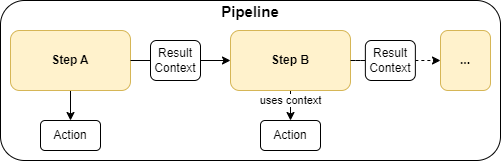
Pipeline Metadata
| Field | Required? | Metadata Type | Description | Example |
|---|---|---|---|---|
| name | Yes | String | A unique identifier for the pipeline which also serves as a human-readable descriptive name. | my-pipeline |
| steps | Yes | list | PipelineStep objects | See PipelineStep definition |
PipelineStep Metadata
| Field | Required? | Metadata Type | Description | Example |
|---|---|---|---|---|
| name | Yes | String | A unique identifier for the step which also serves as a human-readable descriptive name. | my-step |
| action | Yes | String | The action to be performed by the step. This must correspond to a valid Action Name. | my-action |
| is_successor | No | Boolean | Indicates if the context should be derived from the preceding step in the YAML definition. | true |
| context | No | String | The name of the step that should be used as the input context. | my-other-step |
| table_metadata | No | String | The name of the step from which the input table should be taken. | my-other-step |
| options | No | dict | A dictionary of options to be passed to the action. | {"opt1":"val1"} |
Example pipeline definition
This is an example of a pipeline definition in YAML format.
Info
The reference for pipeline actions can be found here.
It contains a list of all available actions, their descriptions and examples
name: test
steps:
    Read First Table:
        action: READ_FILES
        options:
            location: /Volumes/{{env:CATALOG_NAME}}/integration_tests/integration_test_data/csv_customer_data_files/
            extension: csv
            options:
                sep: ;
                header: True
            add_metadata_column: True

    Transform First Table:
        action: TRANSFORM_FILTER
        options:
            condition: Lieblingsgenre LIKE 'Drama'

    Read Second Table:
        action: READ_EXCEL
        is_successor: False
        options:
            path: /Volumes/{{env:CATALOG_NAME}}/integration_tests/integration_test_data/excel_customer_data_files/
            add_metadata_column: True

    Transform Second Table:
        action: TRANSFORM_FILTER
        options:
            condition: Lieblingsgenre LIKE 'Action'

    Union Tables:
        action: TRANSFORM_UNION
        options:
            union_data:
                - ((step:Transform First Table))

    Write Table:
        action: WRITE_CATALOG_TABLE
        options:
            table_identifier: '{{env:CATALOG_NAME}}.integration_tests.customer_data'
            mode: append