Introduction
The Snowflake RBAC (Role-Based Access Control) module is a metadata-driven framework for managing Snowflake roles and privileges. It automates the creation, modification, and deletion of both technical and functional roles based on declarative configuration files.
Technical Roles
Technical roles provide a standardized access pattern for database objects:
- DB OWNER: Ownership privileges at the database level
- SCHEMA OWNER: Ownership privileges at the schema level
- READ: Read-only access to schema objects (SELECT on tables/views)
- WRITE: Write access to schema objects (INSERT, UPDATE, DELETE)
- EXECUTE: Execute privileges for functions and procedures
Technical Role Naming Convention
Technical roles follow a standardized naming pattern:
- Database owner role:
R_T_{DATABASE_NAME}_OWNER - Schema owner role:
R_T_{DATABASE_NAME}_{SCHEMA_NAME}_OWNER - Schema read role:
R_T_{DATABASE_NAME}_{SCHEMA_NAME}_READ - Schema write role:
R_T_{DATABASE_NAME}_{SCHEMA_NAME}_WRITE - Schema execute role:
R_T_{DATABASE_NAME}_{SCHEMA_NAME}_EXECUTE
Where:
- R_T prefix indicates a technical role
- Database and schema names are uppercased
- Role names are automatically generated from metadata
Technical Role Capabilities
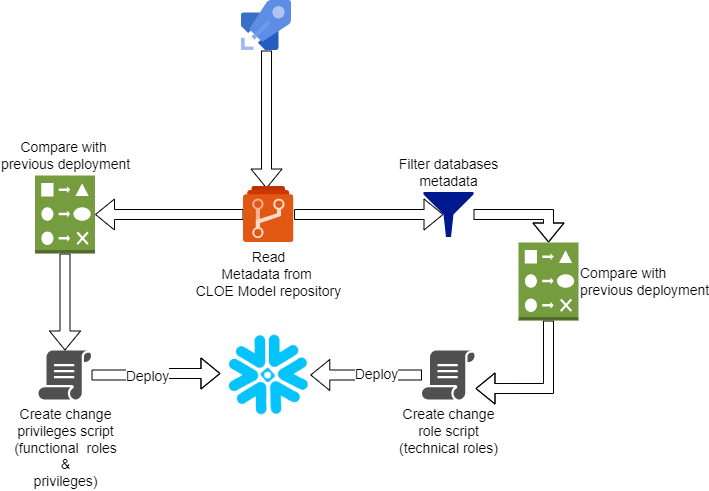
These roles are automatically generated from CLOE database metadata (e.g. from CLOE Snowflake Crawler). The module can:
- Create roles for all databases and schemas in the metadata
- Filter databases using positive/negative regex patterns
- Compare against previous deployments to identify deleted objects
- Automatically drop roles for removed database objects
- Support incremental mode to only create roles for new objects
- All technical roles are granted to SYSADMIN for centralized administration
Functional Roles
Functional roles represent business or organizational roles with customized privileges:
- Define role names that map to business functions (e.g.,
it_developer,business_analyst) - Grant warehouse privileges (USAGE, OPERATE)
- Grant database and schema privileges through technical roles (READ, WRITE, EXECUTE, OWNER)
- Add custom SQL grants for special cases
- Track changes over time using git tags
Functional Role Behavior
- Role names: Defined in YAML are uppercased in Snowflake (e.g.,
it_developer→IT_DEVELOPER) - Double quotes: Role names are wrapped in double quotes to handle special characters
- Role hierarchy: All functional roles are granted to SYSADMIN
- Schema access: Granting
read,write,execute, orowneron a schema actually grants the corresponding technical role - Database owner: Setting
owner: trueat the database level grants ownership on the database itself
Change Detection
The module calculates the difference between deployments and generates appropriate DDL statements (CREATE, GRANT, REVOKE, DROP) to bring Snowflake to the desired state:
- New roles: CREATE ROLE and all necessary grants
- Modified roles: Additional grants or revokes as needed
- Deleted roles: DROP ROLE statements (when role is removed from YAML)
Benefits
- Automated role management: Technical roles are automatically created based on database metadata
- Declarative configuration: Define desired state in YAML; CLOE generates the necessary DDL statements
- Change tracking: Uses git tags to calculate differences between deployments
- Incremental deployments: Option to only create roles for new objects, reducing deployment time
- Database filtering: Flexible regex-based filtering for database selection
- Cleanup automation: Automatically detects and drops roles for deleted database objects
- Integrated workflow: Seamlessly integrates with Azure DevOps Pipelines and other CI/CD tools
Workflow Modes
Full Deployment (Default)
When no git-tag-regex is provided, the module generates roles for all objects in the current metadata:
- Creates all technical roles for databases and schemas
- Creates/updates all functional roles
- No automatic cleanup of deleted roles
Deployment with Cleanup
When git-tag-regex is provided, the module compares current and previous states:
- Detects deleted databases and schemas
- Generates DROP statements for obsolete roles
- Creates roles for new objects
- Updates grants for existing roles
Incremental Deployment
When use-incremental-mode is enabled (requires git-tag-regex):
- Only processes new databases and schemas
- Skips unchanged objects to reduce deployment time
- Ideal for large environments with frequent updates
SQL Generation Process
The module organizes generated SQL statements into deployment groups to ensure proper execution order:
Technical Roles
- Group 0: DROP statements for deleted roles (only with cleanup mode)
- Group 1: CREATE ROLE statements for new roles
- Group 2: GRANT statements for role privileges and role hierarchy (GRANT ROLE TO SYSADMIN)
Functional Roles
- Group 1: CREATE ROLE or DROP ROLE statements
- Group 2: Warehouse and database grants, role hierarchy
- Group 3: Additional custom grants
This grouping ensures that: 1. Obsolete roles are dropped first 2. New roles are created before receiving grants 3. Privileges are granted in the correct order 4. Role hierarchies are established properly
Flow
The exact deployer flow might differ based on use case and infrastructure.