Configuration
Example setup
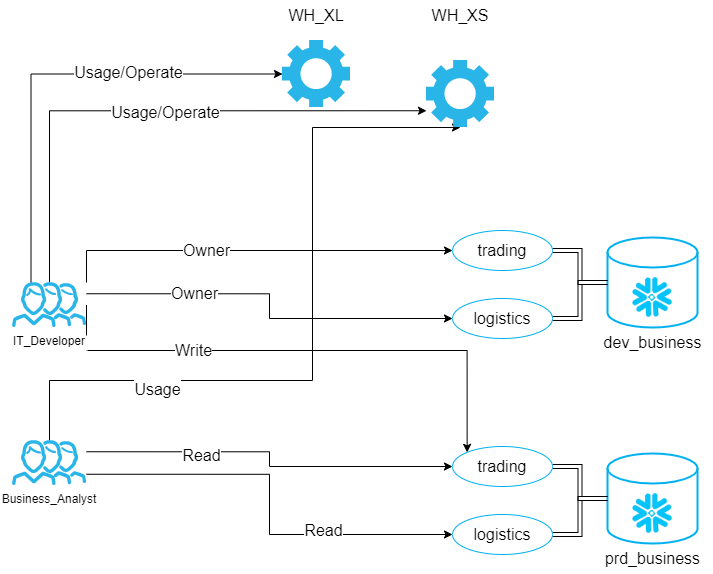
YAML Configuration
The YAML file describes the desired state of functional roles and their privileges within Snowflake. It is stored in a git repository and serves as the source of truth for access control.
Structure
Each top-level key in the YAML file represents a functional role name. The role name will be uppercased when created in Snowflake (e.g., it_developer becomes IT_DEVELOPER).
Role Attributes
Each role can have the following attributes:
warehouses (optional)
A list of warehouse grants for the role.
- name (required): The warehouse name
- usage (optional): Grant USAGE privilege (boolean)
- operate (optional): Grant OPERATE privilege (boolean)
databases (optional)
A list of database-level grants for the role.
- name (required): The database name
- owner (optional): Grant ownership at database level (boolean)
- schemas (optional): List of schema grants within this database
- name (required): The schema name
- read (optional): Grant READ technical role (boolean)
- write (optional): Grant WRITE technical role (boolean)
- execute (optional): Grant EXECUTE technical role (boolean)
- owner (optional): Grant SCHEMA OWNER technical role (boolean)
additional_grants (optional)
A list of custom SQL GRANT statements for special privileges not covered by the standard technical roles. Each statement must be a complete SQL statement ending with a semicolon.
Example Configuration
CLI Arguments
The CLI is called by the DevOps pipeline. CLI arguments can be set in the corresponding YAML file(see downloads).
Technical Role Generator
Command: generate-technical-roles
| Argument | Optional | Description |
|---|---|---|
| git-root-path | Path to where the model is stored respectively where the .git folder is located. | |
| output-path | Path where to store the output SQL file. | |
| --database-model-filepath | Relative path to database model file (from git-root-path). | |
| --database-filter-positive | Regex expressions, use only databases matched by the expression. | |
| --database-filter-negative | Regex expressions, exclude databases matched by the expression. | |
| --git-tag-regex | Regex expressions, should lead to the last deployment tag. Required if use-incremental-mode is enabled. | |
| --use-incremental-mode | Boolean flag (default: False). When enabled, only creates roles and grants for new objects. Requires git-tag-regex to be set. |
Functional Role Generator and Privilege Manager
Command: generate-functional-roles
| Argument | Optional | Description |
|---|---|---|
| git-root-path | Path to where the model is stored respectively where the .git folder is located. | |
| output-path | Path where to store the output SQL file. | |
| --functional-model-path | Relative path to functional role model YAML file (from git-root-path). | |
| --git-tag-regex | Regex expressions, should lead to the last deployment tag. When provided, CLOE will calculate the difference between the current and previous deployment and generate appropriate DDL statements. |
Role Deployer
Command: deploy
| Argument | Optional | Description |
|---|---|---|
| input-sql-path | Path where the SQL script is stored. | |
| --continue-on-error | Boolean flag (default: True). When False, the deployment will stop if any query causes an error. When True, deployment continues despite errors. |
Environment Variables
The deployer uses the cloe_util_snowflake_connector package which requires the following environment variables:
| Environment Variable | Required | Description |
|---|---|---|
| CLOE_SNOWFLAKE_USER | The Snowflake user for authentication. | |
| CLOE_SNOWFLAKE_ACCOUNT | The Snowflake account identifier (e.g., myorg.west-europe.azure). |
|
| CLOE_SNOWFLAKE_WAREHOUSE | The Snowflake warehouse to use for queries. | |
| CLOE_SNOWFLAKE_PASSWORD | Password for authentication. Required if not using key pair authentication. | |
| CLOE_SNOWFLAKE_PRIVATE_KEY | Private key string for key pair authentication. Alternative to password. | |
| CLOE_SNOWFLAKE_PRIVATE_KEY_FILE | Path to private key file. Alternative to password or key string. | |
| CLOE_SNOWFLAKE_ROLE | The Snowflake role to use. If not set, uses the user's default role. |
Note: You must provide exactly one authentication method:
CLOE_SNOWFLAKE_PASSWORD,CLOE_SNOWFLAKE_PRIVATE_KEY, orCLOE_SNOWFLAKE_PRIVATE_KEY_FILE. See thecloe_util_snowflake_connectordocumentation for key pair authentication setup.
CLI Usage Examples
Technical Role Generation
Basic Usage
Generate technical roles for all databases in the metadata:
cloe-snowflake-rbac generate-technical-roles \
  /path/to/git/repository \
  /path/to/output \
  --database-model-filepath databases/databases.json
With Database Filtering
Generate roles only for DEV and TEST databases:
cloe-snowflake-rbac generate-technical-roles \
  /path/to/git/repository \
  /path/to/output \
  --database-model-filepath databases/databases.json \
  --database-filter-positive "^(DEV|TEST).*"
Exclude TEMP and SANDBOX databases:
cloe-snowflake-rbac generate-technical-roles \
  /path/to/git/repository \
  /path/to/output \
  --database-model-filepath databases/databases.json \
  --database-filter-negative "^(TEMP|SANDBOX).*"
With Cleanup (Compare to Previous Deployment)
Generate roles and cleanup obsolete roles from previous deployment:
cloe-snowflake-rbac generate-technical-roles \
  /path/to/git/repository \
  /path/to/output \
  --database-model-filepath databases/databases.json \
  --git-tag-regex "^deploy-prod-.*"
Incremental Mode
Only create roles for new objects (requires git-tag-regex):
cloe-snowflake-rbac generate-technical-roles \
  /path/to/git/repository \
  /path/to/output \
  --database-model-filepath databases/databases.json \
  --git-tag-regex "^deploy-prod-.*" \
  --use-incremental-mode
Functional Role Generation
Basic Usage
Generate functional roles without change tracking:
cloe-snowflake-rbac generate-functional-roles \
  /path/to/git/repository \
  /path/to/output \
  --functional-model-path config/functional_roles.yml
With Change Tracking
Generate roles and calculate differences from previous deployment:
cloe-snowflake-rbac generate-functional-roles \
  /path/to/git/repository \
  /path/to/output \
  --functional-model-path config/functional_roles.yml \
  --git-tag-regex "^deploy-prod-.*"
Deployment
Basic Deployment
Deploy generated SQL to Snowflake:
# Set environment variables
export CLOE_SNOWFLAKE_USER="service_account"
export CLOE_SNOWFLAKE_PASSWORD="password123"
export CLOE_SNOWFLAKE_ACCOUNT="mycompany.west-europe.azure"
export CLOE_SNOWFLAKE_WAREHOUSE="ETL_WH"
export CLOE_SNOWFLAKE_ROLE="ACCOUNTADMIN"

# Deploy technical roles
cloe-snowflake-rbac deploy /path/to/output/technical_roles.sql

# Deploy functional roles
cloe-snowflake-rbac deploy /path/to/output/functional_roles.sql
Stop on Error
Stop deployment immediately if any statement fails:
Complete Workflow Example
# 1. Set Snowflake connection
export CLOE_SNOWFLAKE_USER="service_account"
export CLOE_SNOWFLAKE_PASSWORD="password123"
export CLOE_SNOWFLAKE_ACCOUNT="mycompany.west-europe.azure"
export CLOE_SNOWFLAKE_WAREHOUSE="ETL_WH"
export CLOE_SNOWFLAKE_ROLE="ACCOUNTADMIN"

# 2. Generate technical roles with filtering and cleanup
cloe-snowflake-rbac generate-technical-roles \
  /workspace/git-repo \
  /workspace/output \
  --database-model-filepath metadata/databases.json \
  --database-filter-positive "^(PROD|UAT).*" \
  --git-tag-regex "^deploy-.*"

# 3. Generate functional roles with change tracking
cloe-snowflake-rbac generate-functional-roles \
  /workspace/git-repo \
  /workspace/output \
  --functional-model-path config/functional_roles.yml \
  --git-tag-regex "^deploy-.*"

# 4. Deploy to Snowflake
cloe-snowflake-rbac deploy /workspace/output/technical_roles.sql
cloe-snowflake-rbac deploy /workspace/output/functional_roles.sql