Snowflake Crawler
Introduction
The Snowflake crawler is a Python-based tool that crawls a Snowflake account or database to retrieve metadata about databases, schemas, tables, and columns. It saves this metadata in a CLOE-compliant database metadata format (JSON). The crawler can also update existing metadata repositories, making it ideal for maintaining up-to-date documentation of your Snowflake data structures.
Key Features:
- Crawls databases, schemas, tables, and columns from Snowflake
- Supports selective crawling (e.g., skip columns or tables)
- Filters databases using wildcard patterns
- Merges with existing metadata repositories while preserving IDs and custom attributes
- Replaces database name patterns (useful for multi-environment setups)
- Excludes system databases (SNOWFLAKE, INFORMATION_SCHEMA) automatically
Use Cases:
- Creating initial metadata documentation for existing Snowflake databases
- Maintaining synchronized metadata as database structures evolve
- Working with CLOE modules that require Snowflake database metadata (e.g. RBAC module)
- Multi-environment setups where database names include environment suffixes (DEV, TEST, PROD)
Requirements
- Execution Environment:
- DevOps Pipeline (cloud execution) OR Python 3.11+ (local execution)
- Snowflake Access:
- Snowflake technical user with appropriate privileges
- Permissions to access databases, schemas, and tables
- If retrieving column metadata: READ access to tables
- DevOps (if applicable):
How It Works
The crawler operates in the following sequence:
- Connect to Snowflake: Establishes connection using provided credentials and warehouse
- Retrieve Databases: Fetches all databases (optionally filtered by pattern), excluding system databases
- Retrieve Schemas: For each database, fetches all schemas (excluding PUBLIC and INFORMATION_SCHEMA)
- Retrieve Tables: For each schema, fetches all tables (optionally filtered by table type)
- Retrieve Columns: For each table, fetches column metadata including data types and constraints (if not ignored)
- Transform Data: Applies name replacements and converts to CLOE metadata format
- Merge (if applicable): Merges with existing repository, preserving IDs and custom attributes
- Output: Writes the final metadata to disk as JSON
Flow Diagram
The exact crawler flow might differ based on use case and infrastructure.
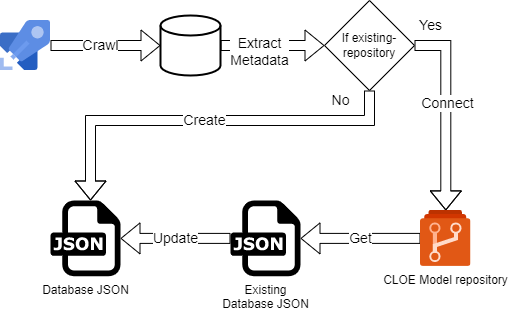
Configuration
Snowflake Connection
The crawler uses the cloe-util-snowflake-connector module (~1.0.5) for all Snowflake connections. Connection parameters are configured via environment variables with the CLOE_SNOWFLAKE_ prefix.
Required Environment Variables:
- CLOE_SNOWFLAKE_USER
- CLOE_SNOWFLAKE_ACCOUNT
- One of: CLOE_SNOWFLAKE_PASSWORD (deprecated by Snowflake) or CLOE_SNOWFLAKE_PRIVATE_KEY / CLOE_SNOWFLAKE_PRIVATE_KEY_FILE (recommended)
Optional Environment Variables:
- CLOE_SNOWFLAKE_WAREHOUSE
- CLOE_SNOWFLAKE_ROLE
- CLOE_SNOWFLAKE_AUTOCOMMIT
For detailed connection setup, authentication methods (password vs. key pair), and Azure DevOps integration, see the CLOE Util Snowflake Connector documentation.
Command-Line Arguments
| Argument | Required | Default | Description |
|---|---|---|---|
output-json-path |
- | Path where the final JSON output will be saved | |
--ignore-columns |
False |
Skip column metadata retrieval. Only retrieve database, schema, and table information | |
--ignore-tables |
False |
Skip table metadata retrieval. Only retrieve database and schema information | |
--existing-model-path |
None |
Path to an existing CLOE repository JSON. If provided, the crawler will merge new data with existing data, preserving IDs and custom attributes | |
--database-filter |
None |
Filter databases using Snowflake wildcard patterns (e.g., COMPANY_% or %_PROD). If not set, all databases except system databases are retrieved |
|
--database-name-replace |
None |
Regex pattern to replace parts of database names with the CLOE environment placeholder {{ CLOE_BUILD_CRAWLER_DB_REPLACEMENT }}. Useful for removing environment suffixes (e.g., _DEV, _PROD) |
|
--delete-old-databases |
False |
When merging with an existing model, remove databases that no longer exist in Snowflake. If False, old databases are preserved in the output |
|
--include-only-base-tables |
True |
Restrict the crawler to include only base tables (regular tables). When True, views and other table types are excluded |
Note on Boolean Flags:
- For flags that default to
False(like--ignore-columns,--ignore-tables,--delete-old-databases), simply include the flag to set it toTrue. Example:--ignore-columns - For flags that default to
True(like--include-only-base-tables), Typer automatically creates a--no-prefix version. Use--no-include-only-base-tablesto set it toFalse.
Installation
Install the package using uv (recommended) or pip:
Usage
Basic Usage
Crawl all databases and save to a JSON file:
# Set environment variables
export CLOE_SNOWFLAKE_USER="your_user"
export CLOE_SNOWFLAKE_PASSWORD="your_password"
export CLOE_SNOWFLAKE_ACCOUNT="xy12345.eu-central-1"
export CLOE_SNOWFLAKE_WAREHOUSE="WH_XS"

# Run crawler
python -m cloe_snowflake_crawler crawl output/metadata.json
Or using uv:
Example: Filter Specific Databases
Crawl only databases matching a pattern:
This will crawl only databases starting with COMPANY_ (e.g., COMPANY_SALES, COMPANY_HR).
Example: Ignore Column Details
Retrieve only database, schema, and table names without column details (faster):
Example: Update Existing Repository
Merge new metadata with an existing repository file:
python -m cloe_snowflake_crawler crawl \
    output/updated_metadata.json \
    --existing-model-path existing/metadata.json
This preserves: - Existing database, schema, and table IDs - Custom display names - Custom table levels or other attributes
Example: Multi-Environment Setup
For environments where database names include suffixes (e.g., SALES_DEV, SALES_PROD):
python -m cloe_snowflake_crawler crawl \
    output/metadata.json \
    --database-filter "%_PROD" \
    --database-name-replace "_PROD$"
This will:
1. Crawl only databases ending with _PROD
2. Replace _PROD suffix with {{ CLOE_BUILD_CRAWLER_DB_REPLACEMENT }} placeholder
Example: Lightweight Schema-Only Crawl
Retrieve only database and schema information (no tables or columns):
Example: Include Views and Materialized Views
By default, only base tables are included. To include all table types:
Example: Full Refresh with Cleanup
Update an existing repository and remove databases that no longer exist:
python -m cloe_snowflake_crawler crawl \
    output/metadata.json \
    --existing-model-path existing/metadata.json \
    --delete-old-databases
Output Format
The crawler generates a JSON file following the CLOE metadata format:
{
  "databases": [
    {
      "id": "uuid-here",
      "name": "DATABASE_NAME",
      "display_name": "Database Name",
      "schemas": [
        {
          "id": "uuid-here",
          "name": "SCHEMA_NAME",
          "tables": [
            {
              "id": "uuid-here",
              "name": "TABLE_NAME",
              "columns": [
                {
                  "name": "COLUMN_NAME",
                  "ordinal_position": 1,
                  "is_nullable": true,
                  "data_type": "VARCHAR",
                  "data_type_length": 255
                }
              ]
            }
          ]
        }
      ]
    }
  ]
}
Behavior Notes
Automatic Exclusions
The crawler automatically excludes:
- System databases:
SNOWFLAKE,SNOWFLAKE_SAMPLE_DATA - System schemas:
PUBLIC,INFORMATION_SCHEMA
Data Type Handling
The crawler extracts and parses Snowflake data types:
- String types:
VARCHAR(n),CHAR(n),STRING,TEXT→ captures length - Numeric types:
NUMBER(p,s),DECIMAL(p,s)→ captures precision and scale - Other types:
DATE,TIMESTAMP,BOOLEAN, etc. → captures type name
ID Preservation
When using --existing-model-path:
- Database, schema, and table IDs are preserved if they exist in the old repository
- New objects receive new UUIDs
- This ensures stable references in downstream CLOE modules
Name Replacement
The --database-name-replace parameter accepts Python regex patterns:
_DEV$→ matches_DEVat the end of the name^TEST_→ matchesTEST_at the start of the name_(DEV|TEST|PROD)$→ matches any of these suffixes
Matched portions are replaced with the {{ CLOE_BUILD_CRAWLER_DB_REPLACEMENT }} placeholder.
About the CLOE_BUILD_CRAWLER_DB_REPLACEMENT Placeholder:
This is a Jinja2-style template placeholder used in multi-environment deployments. When you have databases with environment-specific names (e.g., SALES_DEV, SALES_TEST, SALES_PROD), the crawler can replace the environment suffix with this placeholder. Later, during deployment via DevOps pipelines or CLOE build processes, the placeholder is substituted with the actual target environment name. This allows you to:
- Maintain a single metadata definition across environments
- Automatically adapt database references during deployment
- Keep environment-agnostic configuration in version control
Example flow:
- Source database: SALES_PROD
- After crawler: SALES_{{ CLOE_BUILD_CRAWLER_DB_REPLACEMENT }}
- After deployment to DEV: SALES_DEV
Troubleshooting
Connection Issues
Problem: Unable to connect to Snowflake
Solutions:
- Verify environment variables are set correctly
- Check that the account identifier includes the region (e.g., xy12345.eu-central-1)
- Ensure the warehouse is running and accessible
Permission Errors
Problem: Insufficient privileges to access database/schema/table
Solutions: - Verify the Snowflake role has appropriate READ permissions - Check that the user can access the specified warehouse - If crawling specific databases, ensure the role has access to them
Missing Data
Problem: Expected databases/schemas/tables are missing from output
Solutions:
- Check --database-filter pattern matches the database names
- Verify --include-only-base-tables setting (set to False to include views)
- Ensure the Snowflake role has visibility to the objects
- Check that databases aren't system databases (automatically excluded)
Performance
Problem: Crawler is slow
Solutions:
- Use --ignore-columns to skip column metadata (significantly faster)
- Use --database-filter to limit the scope
- Use a larger warehouse for better performance
- Use --ignore-tables if you only need database and schema information
Best Practices
- Use Database Filters: Limit crawling to relevant databases using
--database-filterto improve performance - Incremental Updates: Use
--existing-model-pathto preserve IDs and custom metadata - Environment Separation: Use
--database-name-replacewith filters for multi-environment setups - Appropriate Permissions: Use a dedicated Snowflake role with minimal required permissions
- Regular Refresh: Schedule regular crawls to keep metadata synchronized with database changes
- Start Small: Test with
--database-filteron a few databases before crawling the entire account
Integration with CLOE
The Snowflake crawler generates metadata that can be consumed by other CLOE modules:
- CLOE Data Catalog: Import metadata for data discovery and lineage
- CLOE Documentation: Generate automatic database documentation
- CLOE Access Control (RBAC): Map database structures to role-based access controls
- CLOE ETL: Use metadata for schema validation and mapping
Environment Placeholder in DevOps
The {{ CLOE_BUILD_CRAWLER_DB_REPLACEMENT }} placeholder enables environment-agnostic metadata definitions. In DevOps pipelines (Azure DevOps, Jenkins, etc.), CLOE build tools automatically replace this placeholder with the target environment identifier during deployment. This means you can:
- Crawl production metadata once
- Use the same metadata JSON across all environments
- Let the deployment pipeline inject the correct environment-specific database names
This approach is particularly valuable when combined with Snowflake cloning or database replication strategies across DEV/TEST/PROD environments.